
Unlock Your Green Thumb with a Smart Plant Sensor for Indoor Use
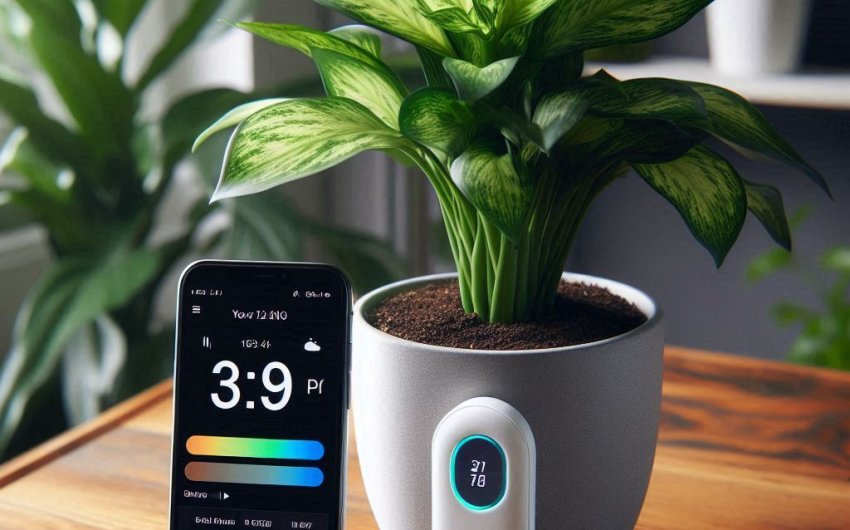
A smart plant sensor for indoor use is a compact device that monitors key environmental factors for your houseplants, providing real-time data and actionable insights directly to your smartphone, empowering you to optimize care. These innovative sensors act as your plant's personal assistant, eliminating guesswork and ensuring your indoor greenery thrives.
Why Should You Use a Smart Plant Sensor for Indoor Plants?
Integrating a smart plant sensor for indoor use into your plant care routine offers numerous advantages, transforming guesswork into precision and boosting your confidence as a plant parent. It's about data-driven nurturing.
How Does a Smart Sensor Solve Common Plant Problems?
Many common houseplant woes stem from misinterpreting a plant's needs. A smart sensor takes the mystery out of it.
- Overwatering/Underwatering: This is the number one killer of houseplants. A soil moisture sensor provides precise, real-time data, telling you exactly when your plant needs water, rather than guessing based on visual cues or a rigid schedule. No more soggy soil leading to root rot, or crispy leaves from drought.
- Incorrect Lighting: Plants often suffer from too little or too much light. A light sensor measures the actual light intensity reaching your plant, helping you find the perfect spot for optimal growth and bloom. It translates vague "bright, indirect light" into measurable data.
- Low Humidity: Many tropical plants crave high humidity. A humidity sensor alerts you when the air is too dry, prompting you to mist, use a pebble tray, or turn on a humidifier.
- Nutrient Deficiencies: Some advanced sensors can even monitor soil fertility, letting you know when your plant is hungry, rather than waiting for visible signs like yellowing leaves.
- Environmental Stability: By tracking temperature, you can ensure your plants are not exposed to cold drafts or extreme heat, which can stress them.
Who Benefits Most from a Smart Plant Sensor?
- Beginners: Takes the guesswork out of plant care, reducing initial frustration and increasing success rates. You learn quickly by seeing the direct impact of your actions.
- Busy Individuals: Provides peace of mind. Get alerts on your phone, making plant care effortless and preventing neglect when life gets hectic.
- Plant Collectors: Especially for those with many plants or expensive rare varieties, a sensor helps optimize conditions for each individual plant, ensuring their valuable collection thrives.
- Travelers: Monitor your plants' conditions remotely while you're away (if connected to Wi-Fi), and instruct a plant sitter on specific needs.
- Analytical Gardeners: For those who love data and precision, a smart sensor offers a wealth of information to fine-tune their care routine.
- Anyone Who's "Killed" a Plant: A smart sensor provides the objective data needed to avoid past mistakes and cultivate a true green thumb.
How Does a Smart Sensor Elevate Your Gardening Game?
- Data-Driven Decisions: Move from guessing to knowing. Instead of wondering if your Fiddle Leaf Fig is getting enough light, the sensor tells you the exact light intensity.
- Proactive Care: Receive alerts before your plant is in distress, allowing you to intervene early and prevent problems.
- Deeper Understanding: Learn about your plants' specific needs and how they react to different environmental changes. This deepens your knowledge and connection with your plants.
- Optimized Growth and Health: When plants receive ideal conditions, they grow faster, produce more vibrant foliage, and are more resilient to pests and diseases.
- Peace of Mind: Knowing your plants are monitored and you'll be alerted to their needs provides a comforting sense of security.
What Key Metrics Does a Smart Plant Sensor for Indoor Use Monitor?
A smart plant sensor for indoor environments typically focuses on the critical factors that directly impact a houseplant's well-being. Understanding these metrics is essential for effective plant care.
1. Soil Moisture
This is often the primary and most valuable measurement provided by a smart plant sensor for indoor use.
- How it Works: The sensor's probe (or probes) is inserted into the potting mix. It measures the electrical conductivity of the soil, which changes based on its water content. The wetter the soil, the higher the conductivity.
- Why it's Crucial: Overwatering is the number one killer of houseplants. Underwatering also stresses plants significantly. A moisture sensor provides precise data, allowing you to water only when the plant truly needs it, preventing soggy soil and root rot, or drought.
- Insights: You'll see real-time moisture levels (often as a percentage or on a scale), historical data showing drying patterns, and get alerts when moisture drops below a customizable threshold. This helps you understand how quickly your specific plant/pot/soil combination dries out.
2. Light Intensity (Lux/PPFD)
Plants rely on light for photosynthesis, but too much or too little can be detrimental.
- How it Works: The sensor uses a photodetector to measure the intensity of light in lux (lumens per square meter) or PPFD (Photosynthetic Photon Flux Density). Lux is a general measure of light brightness, while PPFD specifically measures the light usable by plants for photosynthesis.
- Why it's Crucial: Helps you determine if your plant is in its ideal light spot. Many plants require "bright indirect light," which can be hard to judge. The sensor gives you a numerical value.
- Insights: Daily light integral (DLI), real-time light readings, and recommendations based on the plant species' known light needs. You can identify if your plant is getting scorched by direct sun or is leggy due to insufficient light.
3. Temperature
Temperature affects a plant's metabolic rate and can cause stress if outside its ideal range.
- How it Works: A thermistor measures the ambient air temperature around the plant.
- Why it's Crucial: Helps ensure your plant is not exposed to cold drafts (e.g., near a window in winter) or excessive heat (e.g., near a heating vent). Consistent temperatures are vital for tropical plants.
- Insights: Current temperature readings, historical temperature fluctuations, and alerts if temperatures drop too low or climb too high for your specific plant type.
4. Humidity
Many popular houseplants are tropical and require specific humidity levels to thrive.
- How it Works: A humidity sensor (often capacitive or resistive) measures the amount of water vapor in the air around the plant.
- Why it's Crucial: Low humidity causes crispy leaf edges, stunted growth, and can make plants more susceptible to pests like spider mites. High humidity (coupled with poor airflow) can lead to fungal issues.
- Insights: Current humidity percentage, historical trends, and alerts if humidity levels fall outside the optimal range for your plant.
5. Soil Fertility (EC/TDS)
Some advanced smart plant sensor for indoor use can estimate soil fertility, though this is often less precise for organic potting mixes.
- How it Works: Measures the electrical conductivity (EC) or total dissolved solids (TDS) in the soil, which indicates the concentration of nutrient salts.
- Why it's Crucial: Helps determine when your plant might need fertilizer. Too high EC indicates salt buildup from over-fertilizing; too low suggests nutrient deficiency.
- Insights: General guidance on nutrient levels (often as "low," "normal," "high"). Less common on basic models, and accuracy can vary significantly based on soil type. For precise nutrient monitoring, dedicated soil testing kits are still superior.
By combining these metrics, a smart plant sensor provides a comprehensive overview of your plant's environment, empowering you to make informed care decisions.
How to Choose the Right Smart Plant Sensor for Indoor Use?
With a growing market, selecting the best smart plant sensor for indoor use can be tricky. Consider these factors to find one that perfectly matches your needs.
1. Key Metrics Monitored
- Must-Haves: Most users prioritize soil moisture and light intensity. These are the most common pain points in houseplant care.
- Nice-to-Haves: Temperature and humidity are excellent additions, especially for tropical plants or if you want a complete environmental picture.
- Advanced/Niche: Soil fertility (EC/TDS) is less common and often less reliable for varied organic potting mixes. Only prioritize if you're an advanced user needing this data.
2. Connectivity and App Features
- Bluetooth vs. Wi-Fi:
- Bluetooth: Typically cheaper. Connects directly to your phone when you are within range. Good for small collections in one room. Data often only syncs when connected.
- Wi-Fi: More expensive but offers remote monitoring. Data syncs to the cloud, allowing you to check plant health from anywhere via the app. Ideal for larger collections or if you travel frequently. Requires a stable home Wi-Fi network.
- App Interface:
- User-Friendliness: Is the app intuitive and easy to navigate? Look for clear data displays, graphs, and understandable alerts.
- Plant Database: Does the app have a robust database of plant species with their ideal care ranges? This is invaluable for accurate recommendations.
- Alerts/Notifications: Customizable push notifications for low moisture, extreme temperatures, etc.
- Historical Data: Can you view trends over time to understand your plant's needs?
- Multi-Plant Management: If you have many plants, can the app manage multiple sensors and plants easily?
- Compatibility: Check if the app is compatible with your smartphone's operating system (iOS or Android).
3. Power Source and Battery Life
- Battery Type: Most sensors use coin cell batteries (e.g., CR2032) or AAA batteries.
- Battery Life: Check the estimated battery life. Some can last for months or even a year, while others might need more frequent changes. This affects convenience.
- Rechargeable: Some higher-end models might be rechargeable via USB, which can be more eco-friendly.
4. Durability and Design
- Build Quality: Look for sturdy construction. The probe material should be durable and resistant to corrosion.
- Water Resistance: While designed for soil, ensure the sensor body itself is at least splash-proof or water-resistant, especially if you have an enthusiastic watering can.
- Size and Aesthetics: Consider the size of the sensor relative to your pots and plants. Do you want it to be discreet or a visible part of your plant display?
- Ease of Insertion: Is the probe designed to be easily inserted and removed without damaging plant roots?
5. Price and Value
- Budget: Prices vary significantly, from basic moisture-only sensors to comprehensive multi-metric Wi-Fi-enabled devices.
- Features vs. Cost: Weigh the features you truly need against the price. A cheaper sensor might only give you basic moisture data, while a more expensive one provides a full suite of environmental insights.
- Reviews: Always read user reviews to gauge real-world performance, accuracy, and common complaints.
Table: Smart Plant Sensor Comparison Factors
| Feature | Basic / Budget Model | Mid-Range Model | Advanced / Premium Model |
|---|---|---|---|
| Metrics | Soil Moisture | Moisture, Light, Temp | Moisture, Light, Temp, Humidity, (EC/TDS) |
| Connectivity | Bluetooth | Bluetooth, sometimes limited Wi-Fi | Wi-Fi (remote access) |
| App Features | Basic data, simple graphs | Plant database, alerts, historical | Extensive database, custom alerts, deep insights |
| Battery Life | Moderate (e.g., 3-6 months) | Good (e.g., 6-12 months) | Excellent (e.g., 1+ year) or rechargeable |
| Durability | Adequate plastic construction | Sturdier plastic/metal probe | Premium materials, highly water-resistant |
| Price Range | $15 - $40 | $40 - $80 | $80 - $150+ |
A well-regarded option is the Xiaomi Mi Flora Monitor for its comprehensive features at a mid-range price point.
How to Set Up and Use Your Smart Plant Sensor for Indoor Plants?
Setting up a smart plant sensor for indoor use is generally straightforward, but following these steps will ensure accurate readings and optimal performance.
1. Initial Setup and Pairing
- Unbox and Insert Battery: Carefully unpackage your sensor and insert the required batteries (often a coin cell or AAA).
- Download the App: Scan the QR code in the instruction manual or search for the recommended app in your phone's app store (e.g., Flower Care, Plant Sitter, etc.).
- Create Account (if needed): Follow the on-screen prompts to create an account if required by the app.
- Enable Bluetooth/Wi-Fi: Ensure Bluetooth is enabled on your phone. If it's a Wi-Fi sensor, ensure your phone is connected to your home Wi-Fi network and follow app instructions to connect the sensor to your Wi-Fi.
- Pair the Sensor: In the app, select "Add Device" or "Pair Sensor" and follow the pairing instructions. This usually involves being close to the sensor.
- Select Plant Species: Once paired, the app will prompt you to select the plant species for which the sensor is intended. Search the app's database for your specific plant (e.g., Monstera Deliciosa, Peace Lily, Snake Plant). This step is crucial because the app uses this information to provide tailored care recommendations and optimal ranges for each metric.
2. Placing the Sensor in Your Pot
- Choose the Right Pot: The sensor needs to be in a pot with sufficient soil depth. Avoid very small pots or shallow trays.
- Insert Correctly: Insert the probe(s) firmly into the soil, at least 2/3 of the way down into the pot, but avoid hitting the bottom or resting on rocks/drainage layers.
- Avoid Main Stem/Roots: Place it a few inches away from the main stem of the plant to avoid damaging major roots.
- Representative Spot: Choose a spot that accurately reflects the moisture level of the entire root ball.
- Light Sensor Orientation: Ensure the light sensor (usually a small circular or square opening on the top of the device) is exposed to the ambient light, not blocked by leaves or furniture.
3. Understanding the Data and Taking Action
- Real-time Readings: Regularly open the app to check real-time data on moisture, light, temperature, and humidity.
- Historical Trends: Review the historical graphs. This is incredibly valuable for understanding your plant's needs. For example, if you see the moisture dropping rapidly every 3 days, you know that plant needs more frequent watering.
- Alerts/Notifications: Set up customizable alerts. For example, get a push notification when moisture drops below 30% or when the temperature is outside the optimal range.
- Actionable Insights: The app will compare your plant's current conditions to its ideal ranges and suggest actions (e.g., "Water your Monstera," "Move to a brighter spot," "Increase humidity").
- Learn and Adjust: Use the data to learn how your plants respond to your care. You might discover that your "low light" plant actually thrives with a bit more ambient light than you thought.
4. Ongoing Maintenance of Your Sensor
- Keep Clean: Periodically wipe down the sensor probe with a damp cloth to remove soil residue. Ensure the light sensor is also clean and free of dust.
- Battery Replacement: Monitor battery levels in the app and replace batteries as needed to ensure continuous data monitoring.
- Software Updates: Keep the app updated to benefit from new features, plant database additions, and bug fixes.
- Remove During Watering (Top Watering): If you water from the top, you might consider temporarily removing the sensor to avoid getting the electronic components excessively wet, especially if the device isn't highly waterproof. Reinsert after watering and draining.
- Calibrate (if applicable): Some sensors might offer calibration options. Follow manufacturer instructions if you suspect inaccurate readings.
Common Smart Plant Sensor Challenges and Troubleshooting
While a smart plant sensor for indoor use is designed to simplify plant care, you might encounter minor issues. Here's how to troubleshoot them.
Why Is My Sensor Giving Inaccurate Moisture Readings?
- Poor Soil Contact: The most common reason. The probe might not be inserted deeply enough, or the soil around it is too loose, causing air pockets. Solution: Re-insert the sensor firmly into the soil, ensuring good contact.
- Dry Top Layer, Wet Bottom: If you're only checking the top inch of soil manually, but the sensor is deeper, it might be reading moisture still present in the lower root zone. Trust the sensor's deeper reading, as roots absorb water from below. Solution: Learn to interpret the sensor's reading relative to your plant's preference.
- Soil Type: Very sandy or extremely chunky mixes can sometimes affect moisture sensor accuracy or how quickly water moves. Solution: Be aware that readings might look different for different soil types; learn your plant's specific needs with that mix.
- Salt Buildup: Over time, mineral salts can build up on the probe, interfering with electrical conductivity. Solution: Clean the probe thoroughly with water and a soft cloth.
- Battery Low: A low battery can sometimes cause erratic readings. Solution: Check battery level and replace if needed.
Why Is My Sensor Not Connecting or Syncing Data?
- Out of Range (Bluetooth): If it's a Bluetooth sensor, you might be too far away. Solution: Move your phone closer to the sensor.
- Wi-Fi Issues: For Wi-Fi sensors, check your home Wi-Fi network. Is it stable? Is the sensor too far from the router? Solution: Reboot your router, move the sensor closer to the router, or consider a Wi-Fi extender.
- Low Battery: Insufficient power for connectivity. Solution: Replace batteries.
- App Glitch: The app might need restarting. Solution: Close and reopen the app, or even reinstall it.
- Firmware Update: Sometimes a firmware update for the sensor is needed. Check app notifications for this.
Why Is My Light Sensor Reading Too Low/High?
- Blocked Sensor: The light sensor on the top of the device might be covered by leaves, dust, or an obstruction. Solution: Clear any obstructions and clean the sensor.
- Shadows: The spot you chose might be experiencing fluctuating light due to shadows throughout the day. Solution: Monitor the light readings over a full day. If consistently low, move the plant.
- Incorrect Placement: If the plant is meant to be in bright indirect light but the sensor consistently reads "low," your placement is likely incorrect. Solution: Move the plant (and sensor) to a brighter location.
My App Says "Plant Needs Water," But the Soil Feels Wet.
- Check Sensor Placement: The sensor might be in a dry pocket of soil or not inserted deeply enough into the root ball. Solution: Re-insert the sensor.
- Soil Density/Wicking: If the soil is too dense, water might not be reaching the sensor's depth evenly. If the sensor is reading correctly, it might indicate root rot where roots can't absorb water even if present. Solution: Examine the plant for other signs of root rot (yellowing, mushy stem). If so, repot in a chunkier mix.
- Calibrate: Some apps allow for manual calibration of moisture levels if you consistently find discrepancies.
My Plant is Not Thriving Even with Sensor Guidance.
- Other Factors: A sensor covers major environmental aspects but doesn't solve all plant problems. Consider:
- Pests: Inspect leaves and stems thoroughly for any signs of insect pests.
- Diseases: Look for unusual spots, molds, or wilting.
- Nutrient Issues (beyond EC): A simple EC reading doesn't specify which nutrient is deficient. Visual cues and a balanced fertilizing routine are still important.
- Repotting Needs: Is the plant root-bound? Has it outgrown its pot?
- Drafts/Sudden Changes: The sensor only measures where it's placed. Cold blasts from an open door can still affect the plant even if the sensor's general temperature reading is fine.
- Learn Your Plant's Specifics: While the app database is helpful, every plant is an individual. Observe its unique responses to your care based on the data. For example, a Peace Lily might droop at 30% moisture, while a Snake Plant is happy even at 10%.
A smart plant sensor for indoor use is a powerful tool that brings precision and confidence to houseplant care. By providing real-time data and actionable insights, it helps demystify your plant's needs, leading to healthier, more vibrant indoor greenery and a more rewarding gardening experience for you.